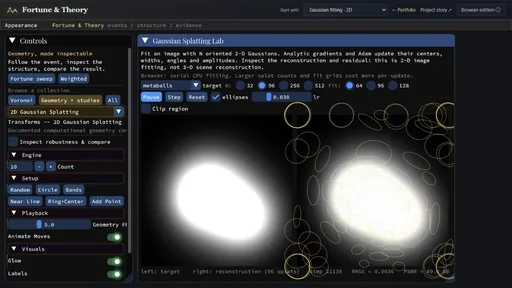
An expanding visual notebook: whenever I finish an algorithm, I add a way to inspect it. A reusable C++ visualization library makes transforms, fitting, graphs and intermediate states easy to visualize and compare; examples include 3D Fourier decomposition with animated signals and 2D Gaussian splat fitting.
Some algorithms are visually simple, and the shared framework favors showing their internal state over a polished individual presentation.
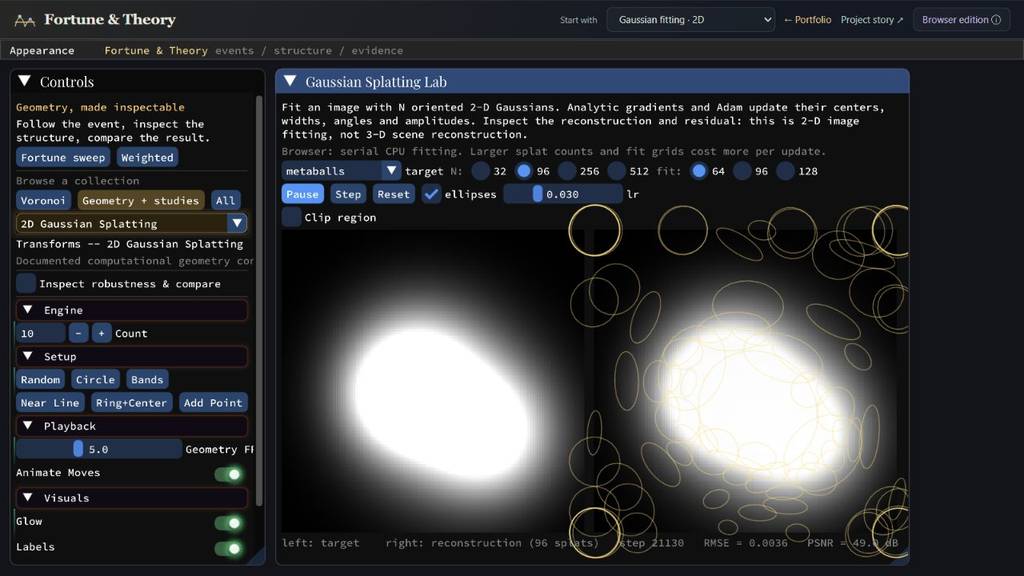
The browser workbench fits a 2D target using 96 oriented Gaussians. The ellipses reveal the optimized representation; this is image fitting rather than 3D scene reconstruction.
Quick start · live feature guide
Change the representation; reveal the mechanism
Fourier studies and Gaussian fitting expose the intermediate representation that connects an input to a reconstruction.
f01
Input
Start from a signal or a target image.
F02
Represent
Inspect Fourier coefficients or a set of Gaussian primitives.
≋03
Modify
Filter bands or optimize the fitting parameters.
↺04
Reconstruct
Compare the visible result with its original target.
Capabilities / connected systems
Read the system by what it makes possible
Related techniques belong to one family. Follow a family into the interface, recorded results and mathematical detail.
See which studies are available in the browser and why the volume viewers still need a port.
Available studiesNative-only volume viewers
Feature set · 2 capabilities
Available studies2D FFT, filter bank and serial Gaussian fitting use browser-compatible presentation.
Native-only volume viewersThe current GLSL330 renderer and asynchronous rebuilds need a separate browser port.
Interactive feature guide · 6 chapters
Use and inspect Theory Workbench
Whenever I finish an algorithm, I want to see it work. This growing notebook reuses a visualization library for controls, coordinated views and intermediate states. Its strongest study links 3D Fourier regions to reconstructed volumes; the broader collection values informative inspection, while dedicated projects give selected ideas a more polished interface.
Description · what it doesExplanation · how it worksTheory · equations & assumptions
Scan the descriptions and figures, or open a layer for the implementation and mathematical detail.
01
Capability family
Fourier decomposition & reconstruction
Follow a source into frequency space, then reconstruct selected contributions.
01 · Signature study · 3D Fourier decomposition
Which part of the spectrum makes this part of the volume?
Description · at a glance
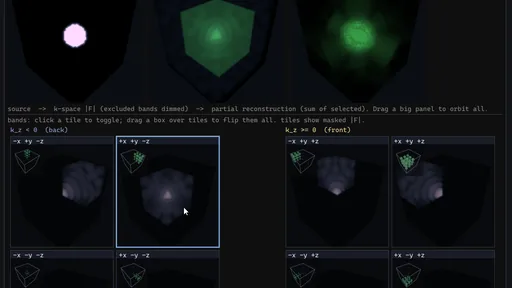
The desktop 3D FFT study connects a source volume, its spatial-frequency spectrum and a partial reconstruction in one coordinated view. Selecting a frequency region shows its reconstructed contribution; selecting several regions shows their sum. A familiar transform becomes a concrete question about which scales and directions create a visible structure.
The filter bank separates octants, spherical or logarithmic shells, azimuth wedges, polar cones, spherical sectors and axis slabs. Each tile pairs its region of frequency space with the volume reconstructed from that region. Camera motion is shared across the major views, and animated sources can be decomposed again as they evolve. This is a distinctive use of the workbench rather than a claim to a new FFT algorithm.
The 3D viewer is currently available in the desktop application. The browser's 2D FFT and radial/angular filter bank provide a smaller, live version of the same source → spectrum → selection → reconstruction idea.
Video The native 3D filter bank shows an input volume, its spectral organization, reconstruction and individual band contributions across several shapes.
Image Native 3D filter bank: source, spectrum and reconstruction above; frequency-region badges and reconstructed band volumes below. The octants are arranged as two frequency-space slabs.
Move the selection; watch the volume respond
4 recordings+
A moving filter changes a rounded volume
Video The spectral filter is adjusted in the middle viewport while the input and reconstructed volume remain alongside it.
Filter a layered volume
Video Change the frequency-space selection and compare the resulting layered spatial structure.
A localized frequency selection
Video A compact volume responds to different spectral selections. The three views keep the input, filter and reconstructed output together.
Which bands preserve the pores?
Video The porous volume changes as the spectral selection moves from broad to selective support.
Theory / mathematicsWhat a frequency contribution meansLinear reconstruction explains the relationship; the rendered brightness is not a percentage attribution.+
A mask multiplies the complex Fourier coefficients, including their phase, before an inverse transform. The magnitude image is only a view of the spectrum. It cannot reconstruct the volume on its own.
The implemented filter bank assigns each frequency bin to one band. By linearity, the sum of the band reconstructions recovers the source up to numerical error. The display uses the real part of each inverse transform; opposite frequency regions are related by conjugate symmetry for a real source. A band's visible contribution can include positive and negative structure, so it is not an independent positive percentage of the final image. Volume transfer functions and compositing further change its apparent brightness.
Disjoint, exhaustive frequency masks form an additive decomposition of a real source. The displayed band volumes use the real reconstructed values.
ExplanationWhy the decomposition costs more than displaying one FFTOne forward transform, a separate inverse for every band, and multiple volume uploads.+
The native implementation computes the forward FFT once, masks the shared coefficients for each region, and runs an inverse FFT per band. Native workers parallelize those inverse transforms. Rebuilding an animated source repeats that work and uploads the band volumes to the renderer; more bands and larger grids increase both computation and display work.
The reusable volume viewer currently uses desktop GLSL 330. Porting that rendering path and the threaded rebuild is separate from compiling the CPU FFT kernel to WebAssembly.
02 · 2D FFT / IFFT
An image has a frequency representation
A two-dimensional discrete Fourier transform expresses an image in spatial-frequency components. Low frequencies describe broad variation; high frequencies contribute fine detail and rapid changes. Frequency is measured across the image, not across time.
The lab displays the input, spectrum and reconstructed image together. Editing a frequency mask and reconstructing makes the relationship visible. A low-pass mask tends to soften edges; a high-pass mask emphasizes variation.
The spectrum retains complex coefficients. The magnitude visualization is an inspection view, not the complete reconstruction data.
03 · Filter-bank study
Separate bands; inspect what each keeps
Radial and angular masks partition the spatial-frequency plane. The resulting images expose scale and orientation as separate properties of the same signal.
A browser launch opens this 2D study directly. The 3D filter-bank volume viewer is a different display path and remains outside the browser build.
Image Actual browser capture: a disk, its partitioned spectrum and the separate reconstructed frequency bands.
02
Capability family
Other representations in the same framework
Gaussian fitting and other algorithm studies reuse the same visualization tools.
04 · 2D Gaussian fitting
Fit the picture with visible primitives
Each primitive has a center, width, angle and amplitude. The reconstruction is assembled from oriented Gaussian functions. Analytic gradients and Adam update those parameters against the target image.
The browser uses the same fitting kernel in serial form. The default 96 primitives and 64 × 64 fitting grid keep the live optimization approachable; increasing either adds CPU work. The ellipse overlay shows where the representation spends its capacity.
Video Compare target and Gaussian approximation for a smooth field, concentric rings and a checkerboard. The sharper examples expose the finite representation budget.
Image Actual browser capture. Target on the left, fitted image and primitive ellipses on the right. The optimizer exposes its step count and reconstruction error.
05 · Related studies
A reusable library for visual experiments
The goal is simple: make the computation visible. I add an algorithm to this collection when I finish it, reusing coordinated views, controls and playback instead of building a new application each time. This is my baseline for inspecting an implementation.
I first imagined a small language for authoring these showcases. That became more machinery than the task needed, so the practical result is a library that makes visualization convenient. Informativeness takes priority here: some studies are visually simple, and a general interface is not always the clearest way to explain a particular algorithm.
For ideas I find especially interesting, I also build dedicated visualizers with more careful interaction and composition. Those take more manual work; the shared workbench lets the wider collection keep growing.
Route
Purpose
Presentation scope
3D FFT decomposition
Connect frequency regions with spatial contributions
Desktop study
2D FFT and filter banks
Make source, spectrum and reconstruction directly comparable
Live browser companion
Gaussian image fitting
Inspect an image representation while its parameters are optimized
See which studies are available in the browser and why the volume viewers still need a port.
06 · Availability and numerical boundaries
Which studies run in the browser?
The browser application compiles the C++ engines and Dear ImGui interface through Emscripten. The 2D FFT, filter-bank and Gaussian-fitting studies provide a live route into Theory Workbench. The native volume viewers remain outside this build; the reason is their rendering and execution setup, not an inability to compute an FFT in WebAssembly.
Larger grids, more fitting primitives and repeated transforms can increase the cost of synchronous CPU work. That performance boundary is different from an excluded viewer. The shared Fortune entrance separately documents its own geometric and numerical limits.
Feature
Browser status
Reason or boundary
2D FFT and 2D filter bank
Available
CPU transform with browser-compatible presentation
2D Gaussian fitting
Available, serial
Analytic-gradient Adam remains active; larger grids/counts add synchronous CPU work
3D FFT volume, KLT eigenvolumes, voxel/JFA3D viewer
Excluded
Their shared desktop GLSL 330 volume renderer has not been ported to GLSL ES/WebGL2
4D FFT and 3D FFT filter bank
Excluded
Same unported volume renderer; larger transforms/filter-bank rebuilds also use native asynchronous workers
Standalone linear-programming interface
Excluded pending validation
No established CPU-solver incompatibility; this UI has not been validated for the browser
More recorded views · 1
Image The 2D filter bank displays spatial-frequency partitions beside their individual reconstructions.
Current scope
This card and the Fortune card launch different collections of the same C++ application.
The 3D and 4D Fourier volume views, KLT eigenvolumes and voxel/JFA views are not available in the browser build. Use the 2D studies for a working browser demonstration.
 01 / 03