Computational photography
Edit gradients or frequencies, stitch overlapping views despite bad matches, recover HDR radiance, and refocus a light field using images alone. Each experiment exposes the intermediate data that makes the result possible.
Explore connections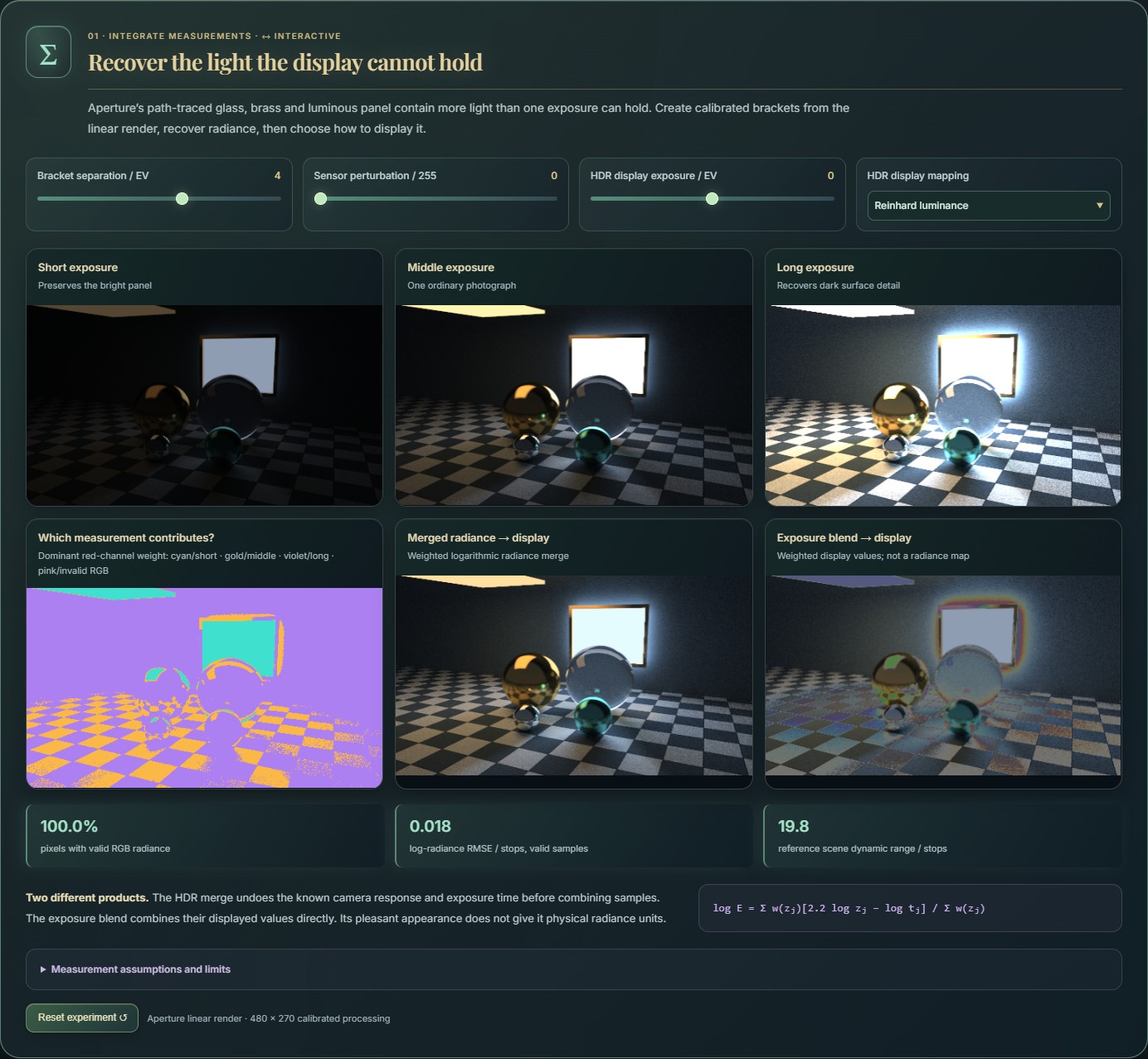
Open the application, then follow what changes
Treat photographs as measurements and change the representation before reconstructing them. Explore bilateral grids, geometric voting, robust stitching, calibrated HDR merging, gradient and frequency editing, and refocusing a rendered camera array using its images alone.
-
01
Collect the evidence
Start with images, exposures, correspondences or calibrated camera-array views.
-
02
Change representation
Lift pixels into grids, gradients, frequency coefficients or ray space.
-
03
Edit or combine
Filter, solve, align or integrate the information in that representation.
-
04
Reconstruct and inspect
Compare the output with residuals and intermediate data.
A photograph can be a collection of measurements
The workbench groups the experiments by the operation that unlocks them: lift image values into a higher-dimensional grid, vote in parameter space, align observations despite bad matches, or integrate measurements across exposure and viewpoint. Each group makes an intermediate representation inspectable.
Make the working representation visible
This collection places an algorithm's intermediate representation beside its input and output. A bilateral-grid view shows image samples arranged by position and intensity. Hough views show how evidence in image space becomes votes for a geometric explanation. Controls connect the representation's resolution and thresholds to the visible result.
The grid implementation stores RGB values and occupancy weights in a Float32Array. Pixels are assigned to spatial and intensity bins, and output values are sampled through trilinear interpolation. The accompanying three-dimensional view uses cell color and weight to expose how samples populate the grid. Its value is the ability to inspect the discretization and the result together.
From pixels to geometric hypotheses
For lines, each selected image pixel votes in a discretized rho–theta accumulator. Sine and cosine values are precomputed for the angular bins, keeping repeated trigonometric evaluation outside the pixel loop. A neighborhood maximum check identifies candidate peaks, which are ranked by vote count and drawn back into the original image.
The generalized Hough study builds an R-table from gradient-direction bins and vectors relative to a drawn template's centroid. It explores candidate positions over sampled scales and rotations. Template and target sampling reduce the amount of voting, making the cost of adding transformation dimensions explicit. Circle views similarly expose radius-dependent accumulators rather than presenting only a final detection overlay.
Inspect a parameter's consequence
Begin with a few drawn lines and compare the image, accumulator, and detected geometry. Raise the vote threshold to see which structures survive, then use the line-field display to examine how parameter-space evidence maps back into image space. In the grid view, vary spatial scale and intensity spacing to inspect changes in the occupied cells.
Each study links its numerical data, candidate selection and visual display, so an intermediate result can help explain the output.
Recover radiance before deciding how to display it
A scene rendered by Aperture supplies linear radiance before display mapping. Simulated camera exposures turn that HDR source into clipped, noisy brackets; inspect their contributions, recover radiance, then choose how to display it. Exposure spacing changes which highlights and shadows are measurable.
The input is an actual path-traced render with retained HDR values, and the exposure brackets use a known camera response. This isolates calibrated radiance merging; unknown-response calibration, motion alignment and deghosting are separate problems.
One scene. One hundred views. Focus after capture.
A simulated 10 × 10 camera array renders a three-dimensional scene from 100 positions. The cameras share orientation and an off-axis reference plane through the common target, so their recorded rays have a consistent calibration. Each view includes its own occlusions, reflections and refractions.
Choose a new focus plane and shear the images in both camera-array dimensions, then average the selected aperture in linear light. Change aperture size to trade depth of field against angular support. A row of cameras supplies the epipolar view; the full two-dimensional array produces the refocused image.
The camera-array images are rendered ahead of time with Aperture; browser refocusing uses the captured images alone. LightField / Neural extends this pipeline with traced scene capture, broader ray-space inspection and neural-representation comparisons.
Make the wrong matches visible before trusting the stitch
Two overlapping crops of the same rendered scene form a small stitching experiment. Supplied correspondences include controlled noise and false matches. Least squares fits every match; RANSAC selects a consensus, then refits. Inspect the match residuals and compare the resulting stitched panoramas, seam and overlap differences.
The experiment uses a scale/rotation/translation model with known source correspondences. It makes robust fitting and image warping visible without adding feature detection to the same lesson. Arbitrary camera perspective needs a richer geometric model, and parallax may need more than one warp.
Change the representation, then reconstruct the image
In gradient space, a pasted patch becomes a boundary-constrained reconstruction. Compare a hard paste against source-gradient and mixed-gradient Poisson solutions; inspect the derivative field and solver residual while moving the patch.
In Fourier space, inspect the centered spectrum and edit a low-pass, high-pass, band or conjugate notch mask. The inverse transform and signed removed component show exactly what the mask kept or discarded. Soft boundaries trade sharp selection for less ringing.
The frequency-editing sample is a viewport capture from RadianceLab, showing glass and a caustic. Its displayed RGB values are appropriate for these image operations. Aperture supplies the separate linear HDR fixture and rendered light-field array; the two sources are credited where they appear.
More recorded views · 3
Current scope
- The current bilateral-grid filter performs a box blur along X only, followed by trilinear sampling of averaged cell colors. It is an illustrative approximation rather than a complete three-dimensional Gaussian bilateral-grid filter.
- Hough inputs use brightness thresholds and sampled parameter spaces. Generalized shape matching samples edges, scales, and rotations, so detection quality depends on those discretization choices.
- The HDR pipeline uses a known synthetic response, and registration uses supplied synthetic matches with a similarity model. Refocusing includes a one-dimensional teaching example and a rendered 10 × 10 camera array with two angular dimensions. These isolate specific principles rather than providing a complete camera-processing stack.